Every app & CLI tool on your Mac.
Checked in one scan.
App Mechanic scans /Applications and your developer toolchains against Homebrew Casks, Mac App Store, Homebrew Formulae, NPM, and Pipx — serving a zero-dependency glassmorphic dashboard right on localhost:8000.
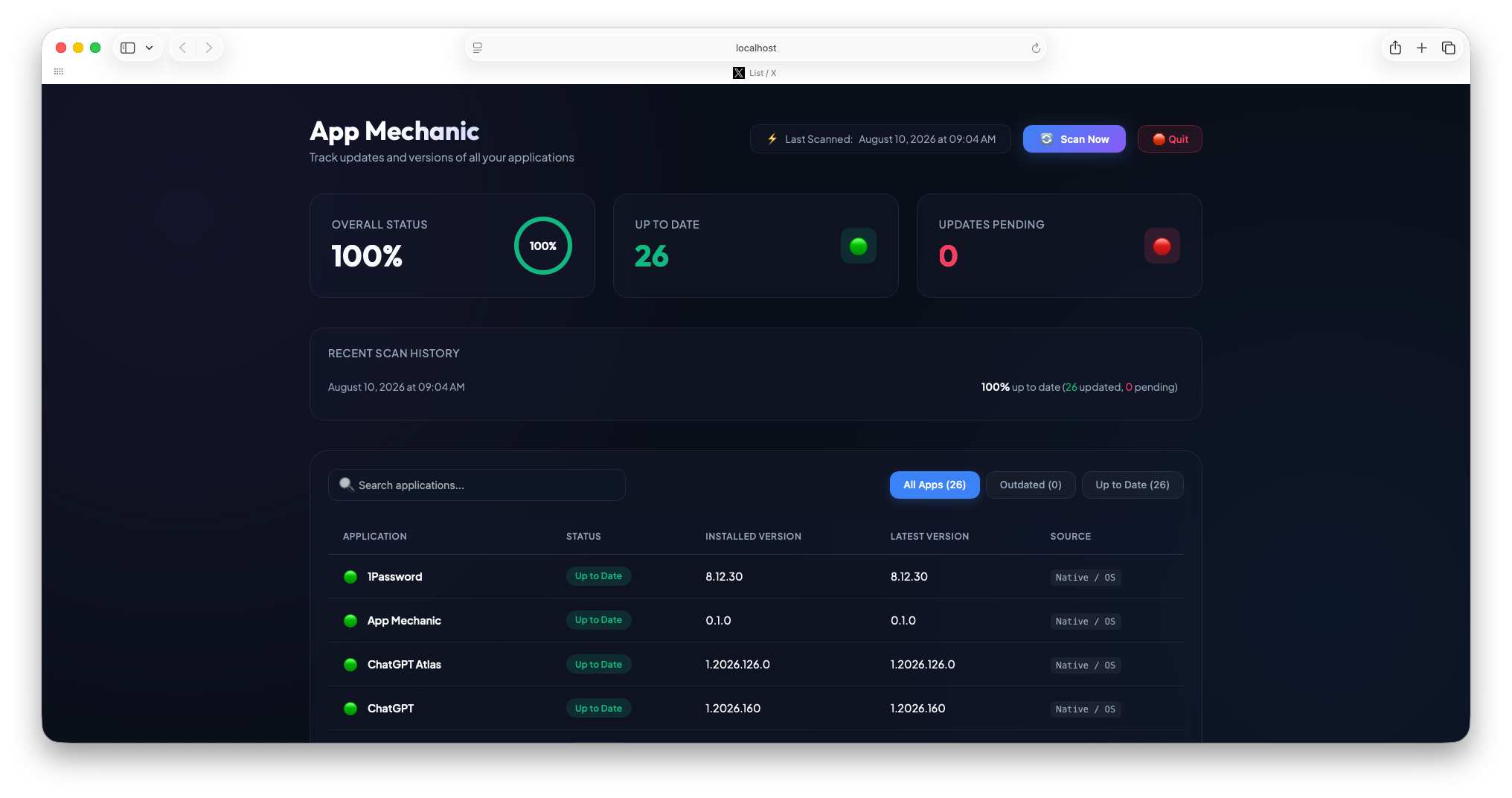
App Mechanic
Track updates and versions of all your applications | macOS 15.1 Up to Date
| Application | Status | Versions | Install Method | Actions |
|---|
UNIFIED VERSION INTELLIGENCE ACROSS MAC APPS, PACKAGE MANAGERS & AI AGENTS
brew
mas outdated
Claude · Grok · Muse · Codex · OpenClaw
npm outdated -g
Vibe · PyPI JSON
Everything under the hood.
Nothing in your way.
Most update checkers only see regular .app bundles or require bloated background agents. App Mechanic bridges GUI apps and developer CLI toolchains in a single featherweight script.
GUI Apps + AI Agents & Developer CLI Toolchains
Scans /Applications alongside Pro-exclusive developer & AI CLI ecosystems: Claude Code, Grok Build, Meta Muse, Mistral Vibe (via uv), OpenAI Codex, Hermes Agent, OpenClaw, Antigravity, brew leaves, global npm packages, and pipx.
Smart Auto-Updater Filtering
Apps like Cursor, VS Code, Obsidian, Discord, Slack, Spotify, Claude, and ChatGPT update themselves silently in the background without always rewriting bundle versions immediately. App Mechanic recognizes self-updating apps and filters out unstable beta, nightly, and canary casks.
One-Click Launch & CLI Upgrades
Upgrade outdated CLI tools directly from the browser — App Mechanic dispatches AppleScript to open macOS Terminal and run brew upgrade, npm install -g, or pipx upgrade automatically. For Mac App Store apps, jump straight to the exact macappstore:// page.
$ brew upgrade ripgrep
==> Upgrading 1 outdated package:
✓ ripgrep 14.1.0 -> 14.1.1
50-Scan History & OS Update Alerts
Stores a rolling log of your last 50 scans in ~/Library/Application Support/AppMechanic so you can watch your system health score climb. Even inspects com.apple.SoftwareUpdate.plist to alert you when a macOS system update is waiting.
Pure Python. Zero Bloat.
Built exclusively on the Python standard library — no Electron, no Node runtime, no heavy background daemons. Double-clicking App Mechanic.app spins up a lightweight single-instance server on port 8000 and opens your default browser. Click Quit in the UI to shut it down completely.
Setup & Prerequisites
App Mechanic is officially code-signed by Lieder Digital, LLC and Notarized by Apple. Pair it with Homebrew and mas for complete coverage.
Install Homebrew & mas
App Mechanic queries Homebrew and the Mac App Store CLI behind the scenes to detect the newest versions available.
/bin/bash -c "$(curl -fsSL https://raw.githubusercontent.com/Homebrew/install/HEAD/install.sh)"
brew install mas
Download & Drag to Applications
Grab the latest notarized AppMechanic.zip release from GitHub, extract it, and drag App Mechanic.app into your /Applications folder.
Launch & Scan
Double-click App Mechanic to run an instant scan and open http://localhost:8000 in your browser. Or run the Python script directly from source:
git clone https://github.com/liederdigital/app-mechanic.git && cd app-mechanic && python3 app_mechanic.py
Start Free. Upgrade for Power Actions.
Try App Mechanic with 3 full system scans for free. Unlock unlimited scans, one-click app launching, automated CLI terminal upgrades, and release ignoring with a Pro license.
Take App Mechanic for a spin and inspect your standard macOS applications.
- ✓ 3 free macOS GUI app scans included
- ✓ Scans
/Applications(Homebrew Casks & Mac App Store) - ✓ Smart auto-updater false-positive filtering
- ✓ Real-time search, status filtering & health score ring
- ✓ 50-scan local history log & macOS update badge
Unlock AI agent & developer CLI scanning, unlimited scans, and 1-click update & launch actions.
- ✓ Unlimited system scans anytime
- ✓ 🤖 25+ AI & Vibe-Coding CLIs (Pro Exclusive): Scans Claude Code, Grok Build, Meta Muse, Mistral Vibe, OpenAI Codex, Gemini CLI, Moonshot Kimi, Herdr, Hermes, OpenClaw, Amp, OpenCode, Qwen, Cline, Kilo, Aider, Goose, Mercury & Antigravity
- ✓ 🛠️ Developer Package Managers (Pro Exclusive): Scans Homebrew Formulae, NPM Global, uv tools & Pipx
- ✓ ⬆️ 1-Click Terminal CLI Upgrades & 🚀 1-Click App Launch
- ✓ 🚫 Ignore / Unignore Specific Releases to keep your score at 100%
Frequently Asked Questions
Why does App Mechanic open in my web browser instead of a native window?
http://localhost:8000 using Python's built-in http.server, App Mechanic avoids bundling a 200 MB Chromium/Electron runtime. You get silky-smooth animations and zero background RAM bloat, and when you click 🛑 Quit in the header, the background server shuts down completely.
Do I need Homebrew and mas installed?
brew install mas) installed. Even for apps you installed manually by dragging a .dmg to /Applications, App Mechanic cross-references their bundle names against the Homebrew Cask JSON catalog to let you know when a newer version is out!
Does App Mechanic send my installed app list anywhere?
formulae.brew.sh, pypi.org, and GitHub Releases to check for App Mechanic self-updates) plus Gumroad's license verification endpoint when activating a Pro key.
What happens if I double-click App Mechanic while it's already running?
App Mechanic.app again simply re-opens http://localhost:8000 to your existing dashboard instantaneously.
Is App Mechanic safe to run on macOS Gatekeeper?
How do I activate my Pro license key?
~/Library/Application Support/AppMechanic/license.json.
Ready to give your Mac a tune-up?
Download App Mechanic for free and see which apps and CLI tools have updates waiting.