Apple Notarized & Signed macOS Utility · Pure Python
App Mechanic Neon Wrench Icon

Every app & CLI tool on your Mac.
Checked in one scan.

App Mechanic scans /Applications (including subfolder bundles), 30+ AI coding agents, and your developer toolchains against Homebrew Casks, Mac App Store, Homebrew Formulae, NPM, uv, and Pipx — serving a zero-dependency glassmorphic dashboard right on localhost:8000.

✓ 3 Free Full Scans Included • ✓ Zero Third-Party Python Dependencies • ✓ 100% Local Privacy
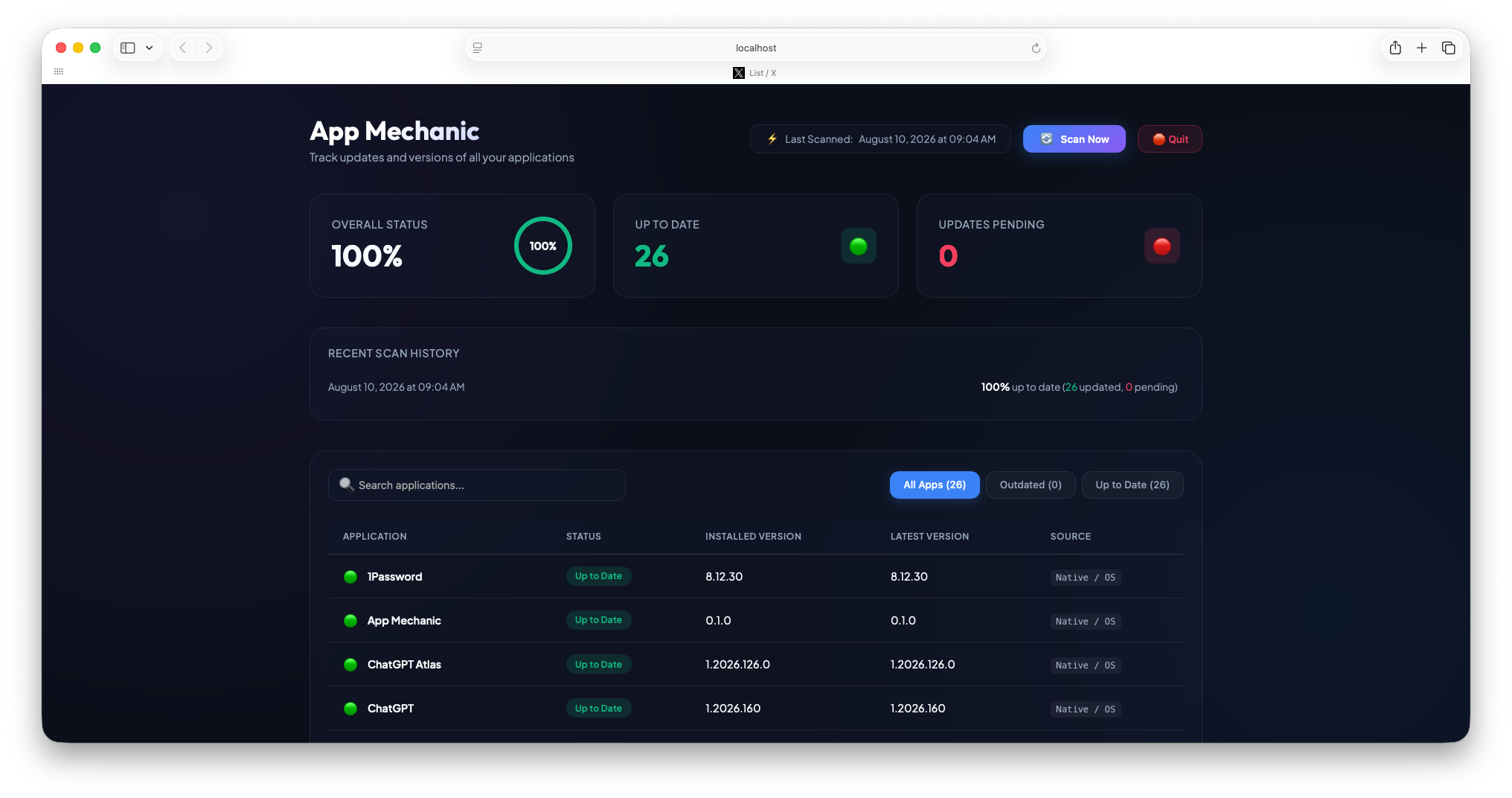
Interactive Preview: Try scanning, filtering, searching, or toggling Pro actions directly in the browser
http://localhost:8000 Local Server

App Mechanic

Track updates and versions of all your applications | macOS 15.1 Up to Date

⚡ Last Scanned: Today at 8:42 PM
OVERALL STATUS
75.0%
75%
UP TO DATE
8
🟢
UPDATES PENDING
3
🔴
IGNORED
1
🟡
🔍
Sort by:
Application ↕ Status ↕ Versions Install Method ↕ Actions

UNIFIED VERSION INTELLIGENCE ACROSS MAC APPS, PACKAGE MANAGERS & AI AGENTS

Homebrew Casks & Formulae brew
Mac App Store mas outdated
AI Coding CLIs Claude · Grok · Muse · Codex · OpenClaw
NPM Global npm outdated -g
Python uv & Pipx Vibe · PyPI JSON
BUILT FOR MAC POWER USERS & DEVELOPERS

Everything under the hood.
Nothing in your way.

Most update checkers only see regular .app bundles or require bloated background agents. App Mechanic bridges GUI apps and developer CLI toolchains in a single featherweight script.

Deep Inspection · Pro Powerhouse

GUI Apps + AI Agents & Developer CLI Toolchains

Scans /Applications alongside Pro-exclusive developer & AI CLI ecosystems: Claude Code, Grok Build, Meta Muse, Mistral Vibe (via uv), OpenAI Codex, Hermes Agent, OpenClaw, Antigravity, brew leaves, global npm packages, and pipx.

🤖 Claude Code & Grok CLI ~/.local/bin ➔ Anthropic & xAI Channels Pro: AI CLI Scanner
✨ Meta Muse, Vibe & OpenClaw muse-stable / uv tool / openclaw-safe-update Pro: 1-Click Terminal Upgrade
🎬 Final Cut Pro.app _MASReceipt ➔ mas outdated Mac App Store
🎨 Figma.app / Antigravity.app Info.plist ➔ Homebrew Cask API macOS GUI Bundle
Zero False Positives

Catalog, Rebrand & MAS Isolation

Isolates Mac App Store receipts (_MASReceipt) from Homebrew Cask rollouts, tracks upstream app rebrands (Superset → Paradev), resolves JetBrains product-info.json builds, queries signed vendor Kaju feeds, and filters unstable beta / nightly casks.

Superset → Paradev Android Studio WhatsApp (MAS) Descript Sublime Text Mail Archiver X Hermes Grok Bot Xmind
Pro Workflow

1-Click Upgrades, Node PATH & Error Logging

Dispatches AppleScript to macOS Terminal with automatic keg-only Homebrew node@XX, nvm, volta & fnm PATH injection. Group rows by Install / Update Type, flag false alarms (🚩), or log failed CLI updates (⚠️) in 1 click.

Terminal — osascript
$ brew upgrade ripgrep
==> Upgrading 1 outdated package:
✓ ripgrep 14.1.0 -> 14.1.1
Health Tracking

50-Scan History & OS Update Alerts

Stores a rolling log of your last 50 scans in ~/Library/Application Support/AppMechanic so you can watch your system health score climb. Even inspects com.apple.SoftwareUpdate.plist to alert you when a macOS system update is waiting.

Oct 23, 8:42 PM 100% healthy
Oct 19, 10:15 AM 88.2% (4 pending)
Oct 12, 4:02 PM 82.4% (6 pending)
Featherweight

Pure Python. Zero Bloat.

Built exclusively on the Python standard library — no Electron, no Node runtime, no heavy background daemons. Double-clicking App Mechanic.app spins up a lightweight single-instance server on port 8000 and opens your default browser. Click Quit in the UI to shut it down completely.

0 pip dependencies
localhost 127.0.0.1:8000
Signed Apple Notarized
UP AND RUNNING IN 60 SECONDS

Setup & Prerequisites

App Mechanic is officially code-signed by Lieder Digital, LLC and Notarized by Apple. Pair it with Homebrew and mas for complete coverage.

01

Install Homebrew & mas

App Mechanic queries Homebrew and the Mac App Store CLI behind the scenes to detect the newest versions available.

Install Homebrew (if needed)
/bin/bash -c "$(curl -fsSL https://raw.githubusercontent.com/Homebrew/install/HEAD/install.sh)"
Install Mac App Store CLI
brew install mas
02

Download & Drag to Applications

Grab the latest notarized AppMechanic.zip release from GitHub, extract it, and drag App Mechanic.app into your /Applications folder.

App Mechanic
App Mechanic.app Signed & Notarized · macOS Universal
Download AppMechanic.zip (v0.6.5)
03

Launch & Scan

Double-click App Mechanic to run an instant scan and open http://localhost:8000 in your browser. Or run the Python script directly from source:

Run from source (Zero dependencies)
git clone https://github.com/liederdigital/app-mechanic.git && cd app-mechanic && python3 app_mechanic.py
RELEASE NOTES & ENGINEERING DISPATCHES

What's New in v0.6.5

Every release sharpens our version detection engine across macOS app bundles, package managers, and AI coding agents.

v0.6.4 November 2, 2026

Update Error Reporter, Node PATH Auto-Discovery, Install Type Sorting & Rebrands

  • ⚠️ Per-Row Update Error Reporter: Log failed CLI/app updates locally to update_errors.json, copy a structured diagnostic block, or file a 1-click GitHub Issue / Email from any row.
  • Keg-Only Node PATH Fix: Automatically locates /opt/homebrew/opt/node@*/bin, nvm, volta, and fnm so 1-click Terminal updates for global npm CLIs (@github/copilot, openclaw) never fail with env: node: No such file or directory.
  • Sort by Install / Update Type: Group all Homebrew, Mac App Store, AI CLI, NPM, uv, Pipx, and Manual / OS items together with one click.
  • App Rebrand Registry (Superset → Paradev): Cross-resolves renamed app bundles and Homebrew Cask tokens without breaking 1-click Launch.
  • Deep Version Fixes: Added single-integer Build XXXX parsing for Sublime Text, 1-level subfolder scanning + Moth Software Kaju feed checks for Mail Archiver X, JetBrains product-info.json inspection for Android Studio, and unmasked ChatGPT updates.
v0.6.3 October 2026

30+ AI Coding Agents & False Alarm Reporter

  • Added Cursor Agent CLI, Factory Droid, Cognition Devin, AWS Kiro, Qoder CLI, Mercury, and Basecamp CLI, plus the 🚩 False Alarm override & inaccuracy reporter.
Engineering Deep Dive 4 min read

Why macOS App Version Numbers Lie to You (And How We Fixed 8 Real-World Edge Cases)

Running App Mechanic across a fleet of Macs (MacBook Air, MacBook Pro, and iMac) quickly reveals a dirty secret of macOS packaging: CFBundleShortVersionString in Info.plist is only half the story.

1. The Truncated JetBrains Plist (Android Studio)

Android Studio stamps only 2026.2 in Info.plist even when you have 2026.2.2.8 installed. The real release version lives inside Contents/Resources/product-info.json under dataDirectoryName (AndroidStudio2026.2.2). App Mechanic now inspects product-info.json and performs prefix-aware build matching.

2. Electron Shell vs. Cloud Engine (Descript & Hermes)

Descript's DMG is versioned 114.0.4 after its cloud editor, but its Electron wrapper stamps 2.22.1 inside app.asar/package.json and Info.plist. Meanwhile, local Hermes.app builds stamp 0.0.1 in Info.plist while the real version lives in hermes --version.

3. Mac App Store vs. Homebrew Cask Drift (WhatsApp)

Direct-download web builds in Homebrew Cask (26.44.12) frequently ship days ahead of Apple App Store review (26.43.75). By verifying Contents/_MASReceipt, App Mechanic isolates Mac App Store apps to mas outdated so you never get nagged about an update Apple hasn't approved yet.

4. Keg-Only Homebrew Node & GUI Subshells

When macOS GUI apps open Terminal via AppleScript, keg-only formulae like /opt/homebrew/opt/node@22/bin aren't always on PATH—causing npm install -g shebangs (#!/usr/bin/env node) to fail with env: node: No such file or directory. App Mechanic now discovers and injects your active Node runtime automatically.

5. Upstream App Rebrands (Superset → Paradev)

When Superset rebranded to Paradev, existing /Applications/Superset.app installs risked losing catalog tracking. Our new rebrand registry cross-maps legacy bundles to their new Homebrew Cask tokens while keeping 1-click Launch pointed at your on-disk bundle.

SIMPLE, HONEST LICENSING

Start Free. Upgrade for Power Actions.

Try App Mechanic with 3 full system scans for free. Unlock unlimited scans, one-click app launching, automated CLI terminal upgrades, and release ignoring with a Pro license.

Free Starter
$0 forever · no account required

Take App Mechanic for a spin and inspect your standard macOS applications.

  • ✓ 3 free macOS GUI app scans included
  • ✓ Scans /Applications (Homebrew Casks, Mac App Store & subfolders)
  • ✓ Smart auto-updater, MAS receipt & rebrand filtering
  • ✓ Real-time search, Install Type sorting & health score ring
  • ✓ 50-scan local history log & macOS update badge
Download Free (.zip)
GOT QUESTIONS?

Frequently Asked Questions

Why does App Mechanic open in my web browser instead of a native window? +
By serving its glassmorphic UI on http://localhost:8000 using Python's built-in http.server, App Mechanic avoids bundling a 200 MB Chromium/Electron runtime. You get silky-smooth animations and zero background RAM bloat, and when you click 🛑 Quit in the header, the background server shuts down completely.
Do I need Homebrew and mas installed? +
Yes — for accurate version comparisons, we strongly recommend having Homebrew and the Mac App Store CLI (brew install mas) installed. Even for apps you installed manually by dragging a .dmg to /Applications, App Mechanic cross-references their bundle names against the Homebrew Cask JSON catalog to let you know when a newer version is out!
Does App Mechanic send my installed app list anywhere? +
Never. All scanning happens 100% locally on your Mac. The app only makes read-only requests to public package catalogs (formulae.brew.sh, pypi.org, and GitHub Releases to check for App Mechanic self-updates) plus Gumroad's license verification endpoint when activating a Pro key.
What happens if I double-click App Mechanic while it's already running? +
App Mechanic has single-instance detection built in. If the server is already running on port 8000 and you closed your browser tab, double-clicking App Mechanic.app again simply re-opens http://localhost:8000 to your existing dashboard instantaneously.
Is App Mechanic safe to run on macOS Gatekeeper? +
Yes! App Mechanic is officially code-signed with a Developer ID by Lieder Digital, LLC and Notarized by Apple, so macOS Gatekeeper verifies its integrity out of the box without scary "unidentified developer" warnings.
How do I activate my Pro license key? +
Click any 🔒 Unlock Pro button in the dashboard table (or when prompted after your 3rd free scan), paste your Gumroad license key into the modal, and click Activate. Your license is saved locally in ~/Library/Application Support/AppMechanic/license.json.
App Mechanic Icon

Ready to give your Mac a tune-up?

Download App Mechanic for free and see which apps and CLI tools have updates waiting.